Game Version, Provider Version or App Update? Three Labels That Mean Different Things
Understand how individual game builds, provider releases and app versions can differ, and why a similar interface or version number does not prove identical game rules.
In this article
- What Is a Game Version?
- What Is a Provider Version?
- What Is an App Version?
- EXAMPLE: Three Version Labels
- Why Version Numbers Do Not Match
- Does a New Provider Version Change Every Game?
- Can the Same Game Have Different Mathematical Configurations?
- EXAMPLE: Visual Change Without Mathematical Evidence
- Why a Familiar Game Logo Is Not Enough
- How Version Differences Affect Troubleshooting
- Game Version vs Completed Result Record
- Does a Version Number Prove Official Software?
- What Should a Version Comparison Include?
- Version Differences Between Browser and App
- Does a Higher Version Mean Better Prediction Accuracy?
- Frequently Asked Questions
- What is a game version?
- What is a provider version?
- Is the app version the same as the game version?
- Can a provider update without changing the game?
- Does a newer game version mean higher RTP?
- Does a version change delete old results?
- Are higher version numbers proof of official software?
- Can two devices display different versions?
- Conclusion
A gaming platform can display several version numbers, but those labels may describe different parts of the software.
For example, the installed Android app may have one release number, a game provider may use another software version and an individual slot or number game may have its own build identifier.
These values do not need to match.
Understanding the distinction helps explain why two game screens can look similar while showing different version information.
This guide compares three software layers using fictional examples. It does not claim that Jai Club exposes every version field described here.
What Is a Game Version?
A game version identifies a particular build or configuration of an individual game.
For example, a slot title might display a version string such as 1.8.2.
That label may refer to its software release, assets or another developer-defined component.
However, the exact meaning is not universal.
A version number does not independently describe the game's full mathematical configuration.
To interpret it correctly, the associated developer documentation is required.
What Is a Provider Version?
A game provider may operate software that supports several titles.
This can include shared services, content delivery, integration components or other systems.
A provider-level version could therefore refer to infrastructure or software used by multiple games.
However, not every provider makes a single public provider-version number available.
It would be incorrect to assume that a generic provider label necessarily identifies the mathematical model of one particular slot.
The scope of the version must be established.
What Is an App Version?
An application version describes a release of the installed or distributed application.
For Android software, version information is generally associated with the application package.
An update may change navigation, compatibility or local functionality.
However, the installed app might load games or other content remotely.
This means an app update does not necessarily modify every individual game version.
The software components can follow separate release cycles.
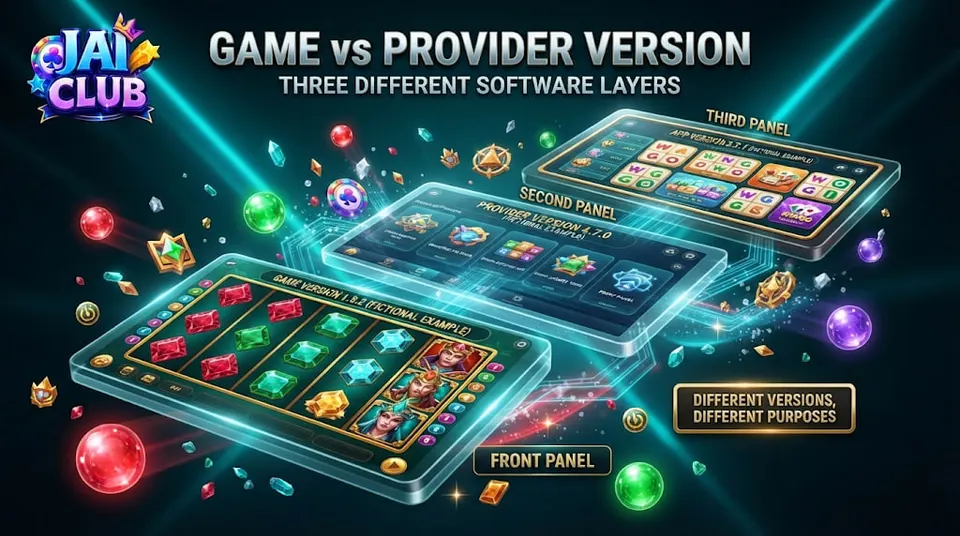
EXAMPLE: Three Version Labels
Consider a fictional gaming platform.
| Component | Example version | What it identifies |
|---|---|---|
| Android host app | 3.2.1 | Installed application release |
| Provider integration | 4.7.0 | Shared provider component |
| Example slot game | 1.8.2 | Individual game build |
EXAMPLE ONLY: These values are fictional.
The different numbers are not contradictory.
They refer to different parts of the software.
A reader should first identify the component associated with each label before comparing them.
Why Version Numbers Do Not Match
Different software components can be developed and released independently.
For example, an Android navigation update might change the app version without changing the embedded slot.
The provider could also update its integration software without publishing a new game build.
Conversely, an individual game's visual assets might change while the host app remains unchanged.
The relationship depends on the platform's architecture.
Matching version numbers are not required.
Does a New Provider Version Change Every Game?
Not necessarily.
A provider-level release may affect a shared service rather than every game.
For example, a technical update could change how certain resources are delivered.
It might leave an individual game's visible controls unchanged.
However, a particular update could also introduce game-specific changes.
The exact scope requires release information.
A version number alone is insufficient for determining what changed.
Can the Same Game Have Different Mathematical Configurations?
Some games can be released with different mathematical configurations or RTP variants.
However, a game-version string and an RTP configuration identifier are not necessarily the same field.
Two visually similar builds might use different documented mathematics.
Alternatively, an updated game interface could retain the same underlying probability model.
The exact configuration must be identified from reliable provider information.
Visual similarity or difference alone cannot establish a change in RTP.
EXAMPLE: Visual Change Without Mathematical Evidence
Imagine a fictional game named Crystal Wheels.
Version 1.8.2 uses blue navigation buttons.
Version 1.8.3 uses gold navigation buttons.
The screenshots look different.
However, no mathematical configuration information is supplied.
Therefore, the visual difference establishes only a presentation change.
It does not prove that the outcome distribution or theoretical return changed.
A separate source would be required to make that claim.
Why a Familiar Game Logo Is Not Enough
A logo can remain the same across different versions.
A third-party interface can also imitate familiar graphics.
Therefore, an image of a game logo does not authenticate the underlying software build.
The exact provider, title and version are more informative.
Even those fields may require reliable source verification.
A promotional screenshot is not a substitute for technical documentation.
How Version Differences Affect Troubleshooting
When an issue occurs, it helps to identify which component is affected.
For example, a game-loading problem might relate to the host app, embedded browser or provider content.
A missing button could involve a game interface version.
An authentication issue may concern the platform's account system.
These problems should not automatically be blamed on the same update.
Different version labels help narrow the description, but they do not independently establish the cause.
Game Version vs Completed Result Record
A version identifier describes software.
A result record describes a completed game event.
These are different data types.
A new game version does not automatically mean that earlier completed result records were rewritten.
Likewise, a result-history interface might change appearance without modifying the underlying records.
To investigate a discrepancy, match the same game, mode and period.
A visual change should not be mistaken for proof that an authoritative outcome changed.
Does a Version Number Prove Official Software?
No.
A third-party application can display a fabricated version string.
An APK with a familiar name may also originate from an unknown publisher.
Version numbers must be considered alongside reliable software identity.
A release labelled Latest or V5 is not automatically authentic.
A credible assessment requires publisher and distribution evidence.
What Should a Version Comparison Include?
A useful comparison identifies the software component first.
Next, record the exact version string.
Then identify the claimed release source and relevant game title.
Finally, describe the observed change without guessing its cause.
For example, "the host app version changed from 3.2.0 to 3.2.1" is more precise than "the game algorithm was updated."
The latter claim would require separate technical evidence.
Version Differences Between Browser and App
A mobile website and installed application can use different update mechanisms.
The app might have its own installed version, while the website loads updated resources from a remote service.
A hybrid application can combine both approaches.
This explains why one screen may show an old app version while using newly delivered game content.
However, the exact behaviour depends on the software.
For related differences, read Colour Trading Website vs App.
Does a Higher Version Mean Better Prediction Accuracy?
No.
An application version does not establish forecasting performance.
A newer release could change only the interface.
A prediction tool claiming improved accuracy requires complete forecasts recorded before the outcomes.
The test should include failures and use an appropriate probability baseline.
A version label such as V10 is not evidence that future numbers can be predicted reliably.
Frequently Asked Questions
What is a game version?
It identifies a release or build of an individual game.
What is a provider version?
It may identify software or integration components managed by a game provider.
Is the app version the same as the game version?
Not necessarily. They can refer to different components.
Can a provider update without changing the game?
Yes, depending on the software architecture.
Does a newer game version mean higher RTP?
No. That claim requires specific mathematical configuration evidence.
Does a version change delete old results?
A version change does not inherently establish that earlier completed records were deleted.
Are higher version numbers proof of official software?
No. Publisher identity must be verified separately.
Can two devices display different versions?
Yes, depending on software releases, cached content and access methods.
Conclusion
Game versions, provider versions and host-app versions can describe different software layers.
They should not be compared as though they identify one universal release.
Understanding what each number refers to helps explain interface differences and technical changes without making unsupported assumptions about game rules or results.
Editorial method: All version strings and game examples are fictional. No private provider release system was audited.
Disclaimer: JaiClubGame.online is an independent educational website. Software versions do not guarantee gaming outcomes.